Timezones- New Feature!

It is important to setup the correct timezone for the location of your properties. Lodgix.com sends out alerts and updates the dashboard at various intervals throughout the day. If you are located on PST time and the application is set to the default EST time, your dashboard could be telling you around 10pm that you have check-ins for that day when in reality the check-ins do not occur until the next day. Setting the application to the correct timezone will correct this problem.


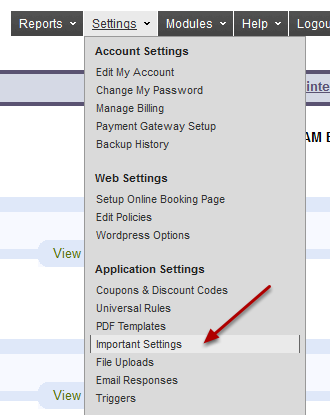
Settings –> Important Settings
media_1305128697929.png


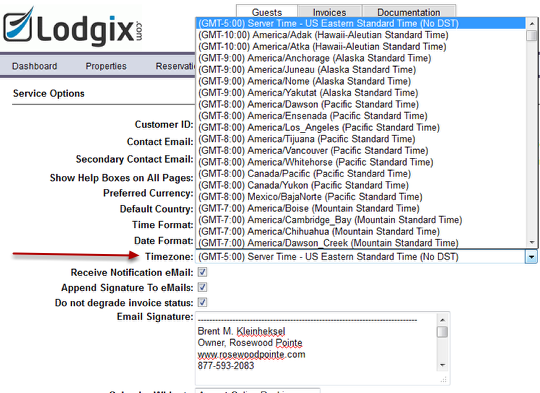
Go to the area for Timezone and choose the closest location to your properties
media_1305128765823.png

Make sure to SAVE your settings at the bottom of the screen!

Related Posts

New Features
Brent Kleinheksel

New Online Booking Experience Has Launched!

Say Hello to the New Lodgix Booking Experience Today we’re thrilled to roll out a completely redesigned online booking and checkout page at Lodgix.com — the page your guests see when they’re ready to reserve. It’s cleaner, calmer, and built from the ground up to turn lookers into bookers. Every

Read More
Location Spotlight
Brent Kleinheksel

The Ultimate Traveler’s Guide to Lake Chatuge, Georgia

Tucked into the southern edge of the Appalachian Mountains and straddling the Georgia–North Carolina border, Lake Chatuge is one of the Southeast’s most scenic mountain lakes. With 132 miles of shoreline, crystal-clear water, and the charming town of Young Harris just minutes away, it’s the kind of place that makes

Read More
Scroll to Top